AI Economics
Local AI coding showdown on a 36 GB Mac: Gemma vs Qwen vs North
This June 2026 local AI coding article documents Gemma, Qwen, and North model runs on the stated 36 GB M4 Max setup. Read its execution results together with quantization, context, runtime, and decoding settings rather than treating a speed figure as a universal hardware benchmark. The comparison separates code correctness from throughput and memory fit. These are the conditions described in that original article, not a newly repeated September experiment or an API price comparison.
No cloud. No API key. Three 4-bit models, Gemma 4, Qwen3.6, and Cohere’s North-Mini-Code, running on an M4 Max via llama.cpp, graded by a harness that actually executes their code. Every number below was measured on the machine, not copied from a benchmark table.
Published on ByteCosts: know what AI actually costs before the invoice.
Key concepts, in plain terms
New to local LLMs? Here is the jargon this piece uses, in one place. Skip to the machine if these are already familiar.
- llama.cpp: open-source C/C++ engine that runs LLMs on your own hardware (Apple’s Metal GPU on a Mac). It serves all three models here, with no cloud.
- GGUF: the single-file format llama.cpp loads a model from (weights plus metadata).
- Quantization (4-bit,
Q4_K_XL): storing the model’s numbers at lower precision (4 bits instead of 16) so a model that would otherwise need roughly 50 GB fits in 16 to 21 GB, for a small accuracy cost.UD-Q4_K_XLis Unsloth’s tuned 4-bit recipe. - MoE, “26B-A4B” (active params): Mixture of Experts. The model holds 26B parameters but routes each token through only about 4B of them, so it computes like a 4B model while knowing like a 26B one. That is why it runs fast on a laptop.
- MTP / speculative decoding: a lossless speedup. A small fast draft proposes the next few tokens and the big model verifies them at once; accepted guesses are free. The output is identical to running without it.
- KV cache: the attention state the model keeps while generating. It grows with the context window and consumes RAM, which is why quantizing it (
q8) buys headroom. - mmap (
--no-mmap): by default llama.cpp memory-maps the model file and pages it in on demand; on an exFAT disk that is pathologically slow, so--no-mmapreads it into RAM once. - Reasoning model: a model that emits hidden “thinking” tokens before its answer; llama.cpp returns that thinking separately from the final reply.
- Multimodal projector (
--mmproj): a small add-on that turns image pixels into tokens, giving a text model vision so it can read screenshots. - quine: a program that prints its own exact source code, a classic self-referential trap.
- The pelican test: Simon Willison’s informal eval, “draw an SVG of a pelican riding a bicycle,” which probes spatial and creative reasoning.
- BFCL (Berkeley Function-Calling Leaderboard): a benchmark for tool and function calling, picking the right tool and filling its arguments.
- LiveCodeBench: a contamination-free coding benchmark; its code-execution task asks the model to predict a snippet’s exact output.
The machine
| Chip | Apple M4 Max |
| Unified memory | 36 GB |
| macOS | 26.5 (build 25F71) |
| Model storage | external SSD at /Volumes/t800, exFAT, 940 GB free |
| llama.cpp build dir | internal APFS (~/Development/modelproject) |
Note the split: GGUFs live on the big external exFAT SSD; llama.cpp itself is built and run from the internal disk. That split counts, see the exFAT gotcha below.
What we’re building
- llama.cpp built with Metal
- Gemma 4 26B-A4B (MoE: 26B total, ~4B active) in GGUF, Unsloth
UD-Q4_K_XL - An MTP draft model for speculative decoding (
--spec-type draft-mtp) - The multimodal projector so the model can read screenshots
- Pi as the terminal coding agent, talking to llama.cpp’s OpenAI-compatible server
- Then two more contenders, Qwen3.6 35B-A3B and Cohere’s North-Mini-Code 30B-A3B, for a three-way head-to-head: the same 16 challenges, each graded by a harness that runs the code
The full Gemma walkthrough (Steps 1-7) is the reproducible recipe; Qwen and North reuse it with the deltas called out. Skip to the showdown if you just want the verdict.
Step 1: Build llama.cpp (Metal)
git clone --depth 1 https://github.com/ggml-org/llama.cpp
cd llama.cpp
cmake -B build -DCMAKE_BUILD_TYPE=Release -DGGML_METAL=ON -DGGML_ACCELERATE=ON
cmake --build build --config Release -j
Built against commit 57fe1f0 (2026-06-13). cmake picked up Metal + Accelerate. The binaries we use: build/bin/llama-cli, llama-server, llama-bench.
Step 2: Download the model (and the first gotcha: xet)
Files needed from unsloth/gemma-4-26B-A4B-it-GGUF:
gemma-4-26B-A4B-it-UD-Q4_K_XL.gguf      16 GB   (main model)
mmproj-BF16.gguf                        1.1 GB  (multimodal projector)
MTP/gemma-4-26B-A4B-it-Q8_0-MTP.gguf    440 MB  (MTP draft head)
The obvious command, hf download unsloth/gemma-4-26B-A4B-it-GGUF <files> --local-dir …, crawled at ~0.8 MB/s and kept slowing down (Fetching 3 files: 0%), ETA in hours. That’s the xet transfer protocol. A raw single-connection HTTPS test against the same CDN measured 9.83 MB/s, so the connection was fine; xet was the bottleneck. HF_XET_HIGH_PERFORMANCE=1 did not help.
Fix: disable xet, keep hf’s hash-verified downloader:
HF_HUB_DISABLE_XET=1 hf download unsloth/gemma-4-26B-A4B-it-GGUF \
  gemma-4-26B-A4B-it-UD-Q4_K_XL.gguf \
  mmproj-BF16.gguf \
  MTP/gemma-4-26B-A4B-it-Q8_0-MTP.gguf \
  --local-dir /Volumes/t800/model/unsloth-gemma-4-26B-A4B-it-GGUF
Immediately jumped to 8-20 MB/s. (Your mileage with xet may vary by region/peering, but if it’s slow, HF_HUB_DISABLE_XET=1 is the first thing to try.)
Step 2.5: The big one: exFAT + mmap = a 50-minute hang
First benchmark attempt just… sat there. After 49 minutes the process was still at 97% on a single core with only 1.4 GB resident of the 16 GB model.
Cause: llama.cpp memory-maps the GGUF by default and pages it in lazily on access. Random page faults serviced by macOS’s exFAT (fskit) driver are pathologically slow, so the model never finished loading.
Fix: --no-mmap (one sequential read into RAM instead of random page faults):
with mmap (default):   ~1.4 GB loaded in 49 min  → unusable
with --no-mmap:        full 16 GB resident in ~30 s → normal
Tradeoff: the whole model sits in RAM (16 GB of 36 GB here, fine, no swap). If you keep models on internal APFS, mmap is fine and you don’t need this. The hang is specific to mmap-off-exFAT. Every llama-cli/llama-server command below uses --no-mmap.
Step 3: Benchmark methodology
Same tool for every number so deltas are fair: llama-cli, greedy, fixed-length output.
llama-cli -m "$MAIN" -p "$PROMPT" \
  -n 128 -c 4096 -ngl 999 -fa on \
  --no-mmap --ignore-eos --temp 0 -st --simple-io
--ignore-eos --temp 0→ exactly 128 greedy tokens every run → reproducible, low-noise.-st(single-turn) → generate one response and exit. Plain-no-cnvdropped into an interactive loop and hung in this build;-stis the reliable non-interactive switch.- This build prints a compact
[ Prompt: X t/s | Generation: Y t/s ]summary line. llama-benchis great but cannot drive MTP speculative decoding (no--spec-*flags), so it’s only a baseline cross-check; the MTP comparison usesllama-clifor both sides.
Prompt (128 tokens generated): "Write a compact Python function that parses a unified diff and returns the changed file paths. Then explain two edge cases."
Step 4: Baseline vs MTP, and tuning --spec-draft-n-max
Add the draft model and turn on MTP:
llama-cli -m "$MAIN" \
  -md "$DRAFT" --spec-type draft-mtp --spec-draft-n-max 3 \
  -p "$PROMPT" -n 128 -c 4096 -ngl 999 -fa on \
  --no-mmap --ignore-eos --temp 0 -st --simple-io
Generation throughput, median of 3 interleaved rounds (raw runs in brackets):
| Setup | Generation tok/s | vs baseline |
|---|---|---|
| Baseline (main only) | 75.1 [74.6, 75.1, 75.9] | 1.00× |
MTP --spec-draft-n-max 1 | 103.0 [102.2, 104.3, 103.0] | 1.37× |
MTP --spec-draft-n-max 2 | 105.8 [105.7, 106.7, 105.8] | 1.41× |
MTP --spec-draft-n-max 3 | 104.4 [96.7, 105.4, 104.4] | 1.39× |
MTP --spec-draft-n-max 4 | 98.5 [97.4, 98.5, 100.1] | 1.31× |
MTP --spec-draft-n-max 5 | 94.4 [93.8, 94.4, 94.6] | 1.26× |
MTP --spec-draft-n-max 6 | 88.3 [87.4, 88.3, 89.3] | 1.18× |
Prompt processing stays ~283 tok/s across every setting, MTP only touches generation, as expected.
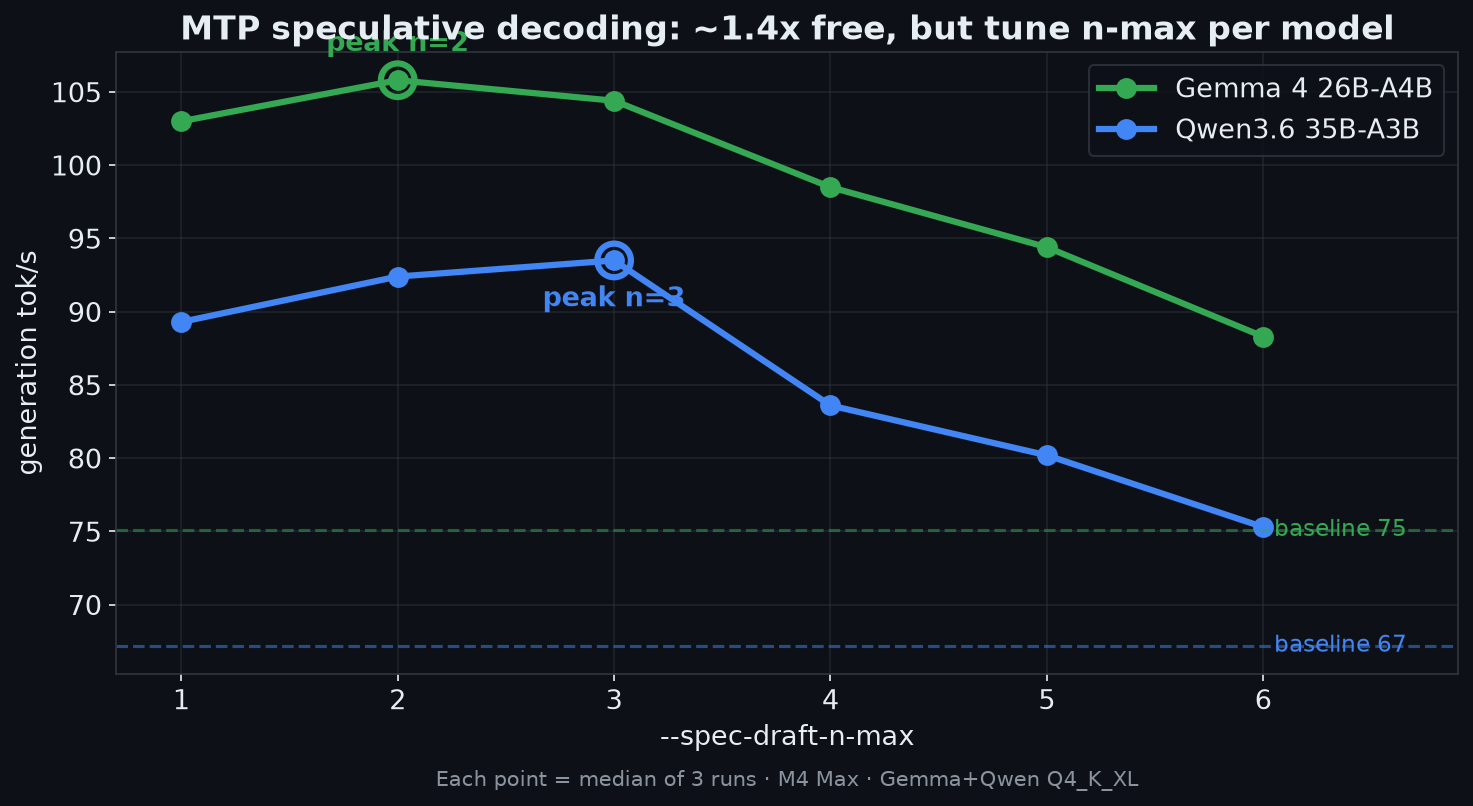
Both models measured here (Qwen’s curve, Step 8, shown for contrast). The peak moves with the hardware/model, Gemma tops out at n=2, Qwen at n=3, so sweep yours; don’t copy a number.
Takeaways:
- MTP is clearly worth it: +41% generation throughput on this machine, no quality change (speculative decoding is exact).
- The sweet spot here is
--spec-draft-n-max 2(n=3 is statistically tied). The reference guide found n=3 best on an M1 Max, Unsloth explicitly say the optimum is hardware-dependent and to sweep 1-6. On the M4 Max it landed at 2. Sweep on yours. - Above n=3, throughput falls off monotonically, drafting too far ahead wastes work when the target model rejects the speculation.
- Run benchmarks 3× and take the median: single runs swung ±15% here (e.g. one n=3 run read 96.7 vs a median of 104.4).
Step 5: Add the multimodal projector (screenshots)
Gemma 4 26B-A4B isn’t natively multimodal; you add vision by loading the projector with --mmproj. The question is whether that taxes text generation. It doesn’t:
| Generation tok/s (2 runs) | |
|---|---|
| MTP n=2, no projector | 106.9, 107.0 |
| MTP n=2, + projector | 106.7, 105.9 |
Within noise, loading the projector costs ~0 on text throughput. So there’s no reason to run without it; keep it loaded and you can paste screenshots to the agent for free.
Step 6: Serve it (OpenAI-compatible)
llama-server \
  -m  gemma-4-26B-A4B-it-UD-Q4_K_XL.gguf \
  --model-draft MTP/gemma-4-26B-A4B-it-Q8_0-MTP.gguf \
  --spec-type draft-mtp --spec-draft-n-max 2 \
  --mmproj mmproj-BF16.gguf \
  --no-mmap \
  -ngl 999 -fa on \
  -c 32768 --parallel 1 \
  --host 127.0.0.1 --port 8088
Notes for this machine:
--no-mmapagain, same exFAT reason.- Port 8088, not 8080: 8080 was already taken here (
couldn't bind HTTP server socket). Pick a free one:lsof -iTCP:8080 -sTCP:LISTEN. -c 32768, not 65536. With 36 GB RAM and the 16 GB model held resident (no mmap), free memory drops to ~16% with the server up; 32K context is the safe ceiling here. The 64 GB reference machine can afford 65536.
Ready in ~12 s (model warm in cache). Verify:
curl -s http://127.0.0.1:8088/v1/models
# -> "capabilities": ["completion", "multimodal"]   (projector loaded)

curl -s http://127.0.0.1:8088/v1/chat/completions -H "Content-Type: application/json" \
  -d '{"model":"gemma-4-26B-A4B-it-UD-Q4_K_XL.gguf",
       "messages":[{"role":"user","content":"What is a unified diff?"}],"max_tokens":400}'
Heads-up: this Gemma 4 build is a reasoning model. llama.cpp returns the chain-of-thought in reasoning_content and the final answer in content. With a small max_tokens you get an empty content (finish_reason: length) because it spent the budget thinking. Give it room (maxTokens ≥ a few thousand).
A start_gemma.sh that wraps this in tmux is in the repo.
Step 7: Wire up Pi as the coding agent
Pi reads providers from ~/.pi/agent/models.json. Don’t overwrite it if you already use Pi, merge a new provider in (back it up first). The gemma4-local provider:
"gemma4-local": {
  "name": "Gemma 4 Local",
  "baseUrl": "http://127.0.0.1:8088/v1",
  "api": "openai-completions",
  "apiKey": "local",
  "authHeader": false,
  "compat": { "supportsDeveloperRole": false, "supportsReasoningEffort": false },
  "models": [{
    "id": "gemma-4-26B-A4B-it-UD-Q4_K_XL.gguf",
    "name": "Gemma 4 26B-A4B Q4 + MTP",
    "reasoning": true,
    "input": ["text", "image"],
    "contextWindow": 32768,
    "maxTokens": 8192,
    "cost": { "input": 0, "output": 0, "cacheRead": 0, "cacheWrite": 0 }
  }]
}
Key fields: baseUrl → the llama.cpp server; authHeader: false (local, no key); input: ["text","image"] (else Pi treats it text-only and won’t send screenshots); reasoning: true (this build emits reasoning_content). Confirm:
pi --offline --list-models gemma
# provider      model                               context  max-out  thinking  images
# gemma4-local  gemma-4-26B-A4B-it-UD-Q4_K_XL.gguf  32.8K    8.2K     yes       yes
Real task through Pi against the local model:
pi -p --provider gemma4-local --model gemma-4-26B-A4B-it-UD-Q4_K_XL.gguf \
  "Write a Python function is_palindrome(s) that ignores case and non-alphanumeric chars. Code only."
→
import re
def is_palindrome(s):
    clean_s = re.sub(r'[^a-zA-Z0-9]', '', s).lower()
    return clean_s == clean_s[::-1]
That’s the full loop: Pi → llama.cpp server → Gemma 4 + MTP → correct code, all local.
Does it actually code? 16 challenges
tok/s is meaningless if the output is wrong. So I built a verifiable gauntlet: each task is sent to the server, the code block extracted and executed against hidden assertions in a sandboxed subprocess (code_eval.py). A pass means it genuinely runs correctly. Greedy (temperature 0), max_tokens 8192. Four flavors:
- Greenfield: write a function from scratch.
- Bug-fix-given-failing-test: read broken code + the failing test, fix it.
- Gotchas: tasks LLMs are documented to flub (Easy Problems That LLMs Get Wrong): overlapping counts, a “looks like balanced-brackets but isn’t” trap, the
0.1 + 0.2float classic. Anti-cheat:eval()/reare banned where they’d trivialize the task. - The viral one: Simon Willison’s “Generate an SVG of a pelican riding a bicycle”, rendered to PNG with headless Chrome.
Gemma 4 26B-A4B Q4 + MTP: 14/15 verifiable
| # | Task | Flavor | Result | Time | tok/s |
|---|---|---|---|---|---|
| 1 | merge_intervals | greenfield | ✅ | 5.7 s | 104.6 |
| 2 | is_balanced | greenfield | ✅ | 6.4 s | 107.3 |
| 3 | changed_files (parse a diff) | greenfield | ✅ | 27.5 s | 102.8 |
| 4 | LRUCache (O(1)) | greenfield | ✅ | 26.9 s | 98.4 |
| 5 | roman_to_int | greenfield | ✅ | 10.1 s | 108.3 |
| 6 | bugfix_mutable_default | bug-fix | ✅ | 3.9 s | 107.6 |
| 7 | bugfix_binary_search (off-by-one) | bug-fix | ✅ | 13.3 s | 108.8 |
| 8 | bugfix_to_base (skips 0) | bug-fix | ✅ | 6.5 s | 107.7 |
| 9 | quine (prints own source) | hard | ❌ spiral | 169 s† | 96.7 |
| 10 | calc_precedence (no eval) | hard | ✅ | 42.4 s | 101.6 |
| 11 | regex_is_match (./*, no re) | hard | ✅ | 26.7 s | 102.8 |
| 12 | edit_distance (Levenshtein) | hard | ✅ | 14.9 s | 106.1 |
| 13 | count_overlapping | gotcha | ✅ | 22.5 s | 103.7 |
| 14 | deep_nesting (≥3 deep) | gotcha | ✅ | 7.7 s | 108.2 |
| 15 | bugfix_float_eq (0.1+0.2) | gotcha | ✅ | 34.4 s | 102.6 |
It nailed every gotcha, overlapping count, the depth-≥3 trap (didn’t fall for “balanced brackets”), the floating-point comparison, plus a from-scratch regex engine and an expression evaluator with eval() banned.
The one failure is the interesting one. †The quine broke it. Gemma is a reasoning model, and a self-reproducing program is exactly the kind of self-referential puzzle that sends it into an infinite think-spiral: it generated 16,384 tokens of reasoning, ~170 seconds straight, and never emitted a finished program (finish_reason: length). A 26B model that writes a correct Levenshtein DP and a regex matcher first try, but talks itself to death on a quine. (Hold that thought. At the temperature Gemma’s makers actually recommend, this spiral vanishes, and it turns out to be the most useful finding in the whole piece. See the parameters section near the end.)
The pelican 🚲🐦
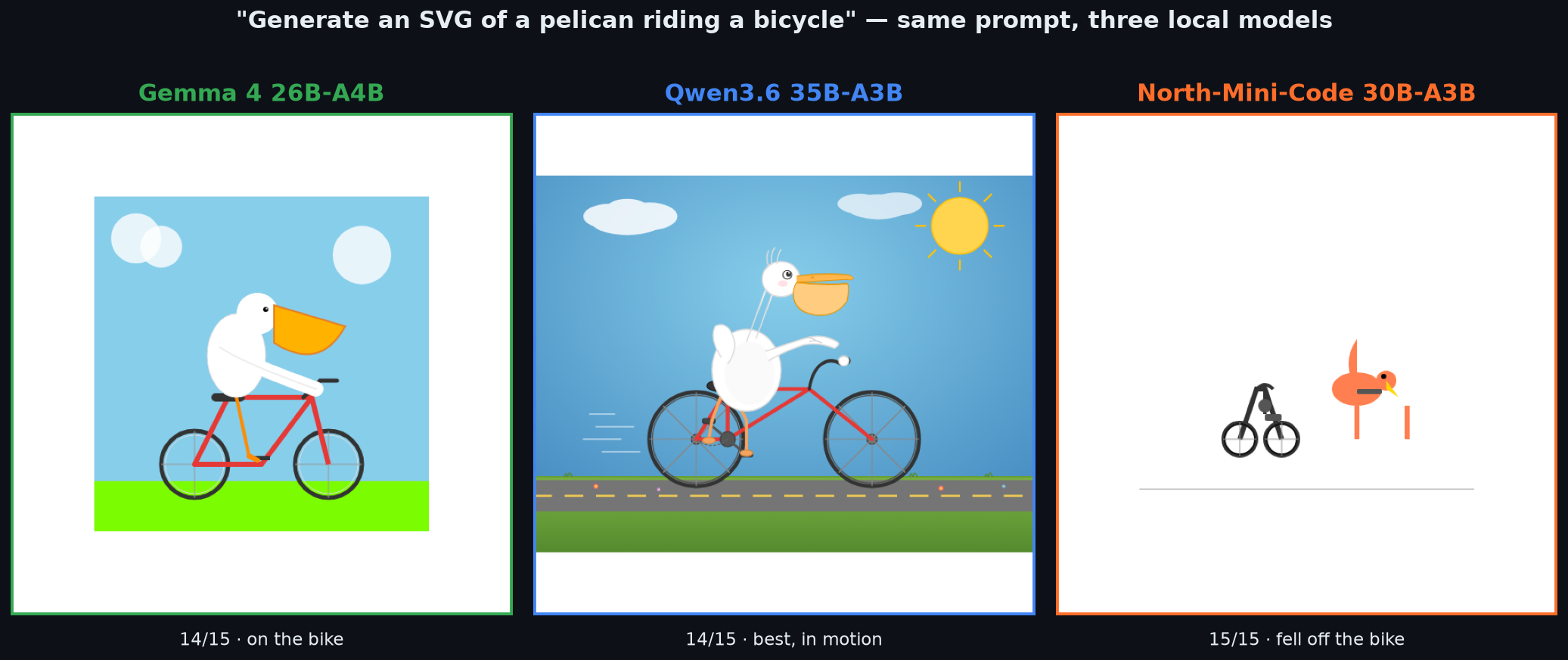
Prompt: “Generate an SVG of a pelican riding a bicycle.” One shot, 39 s, 2.8 KB of SVG:

White body, an actual orange pouch (the pelican tell), an eye, a red bicycle with spoked wheels and pedals, sky/clouds/grass. For a 4-bit local model running on a laptop, that’s a shockingly coherent pelican.
Step 8: Qwen3.6 35B-A3B: the challenger
Same recipe, one difference: Qwen3.6’s MTP head is baked into the main GGUF, so you enable speculative decoding with --spec-type draft-mtp and no --model-draft. The download (unsloth/Qwen3.6-35B-A3B-MTP-GGUF) is 21 GB for the main model. On 36 GB you cannot run Gemma and Qwen at once, stop one first.
MTP sweep: Qwen peaks at n=3
| n-max | gen t/s (median of 3) | speedup |
|---|---|---|
| baseline | 67.2 | 1.00× |
| 1 | 89.3 | 1.33× |
| 2 | 92.4 | 1.38× |
| 3 | 93.5 | 1.39× |
| 4 | 83.6 | 1.24× |
| 5 | 80.2 | 1.19× |
| 6 | 75.3 | 1.12× |
Same MTP win (~1.4×), but the optimum is n=3 vs Gemma’s n=2, and Qwen tops out at 93.5 t/s vs Gemma’s 105.8, slower, because it’s a bigger model (35B vs 26B total).
Gauntlet: 14/15, and the quine plot twist
| Result | Tasks |
|---|---|
| ✅ 14 PASS | all greenfield, all bug-fixes, all gotchas, calc (no eval), regex (no re), Levenshtein |
| ❌ 1 FAIL | quine |
Both models score 14/15. Both fail only the quine, but in opposite ways:
- Gemma never finishes: it think-spirals past 16,384 tokens and emits no complete program.
- Qwen finishes a complete, running program in 57 s, but it’s a wrong quine (
stdout != source). It commits to an answer; the answer just isn’t self-reproducing.
The other tax is speed. Qwen is slower per token (~85 vs ~105 t/s) and more verbose, so wall-clock blew out on the hard tasks: LRUCache 80.8 s (Gemma 26.9 s), regex_is_match 99.6 s (Gemma 26.7 s), bugfix_float_eq 75.3 s (Gemma 34.4 s).
The pelican: Qwen pulls ahead
Where Qwen earns its “better coder” reputation is the open-ended task. Same prompt, 61 s, 9.7 KB of SVG (vs Gemma’s 2.8 KB):

Eyelashes and a blushing cheek, a wing on the handlebar, a foot on the pedal, motion lines, a road with reflectors, a rayed sun. It’s not just bigger, it reads as a pelican in motion. Gemma’s was clean and correct; Qwen’s has intent. Better, but it took 1.6× longer.
Step 8b: The specialist: North-Mini-Code-1.0 (Cohere)
A wildcard third contender: unsloth/North-Mini-Code-1.0-GGUF, Cohere Labs’ 30B-A3B MoE built specifically for agentic coding (3B active params). Same quant tier (UD-Q4_K_XL, 19 GB).
Gotcha: it won’t load on stock llama.cpp. North uses the cohere2moe architecture, which isn’t in mainline (you’ll get unknown model architecture: 'cohere2moe'). You need the unmerged PR #24260:
git fetch origin pull/24260/head:cohere2-moe && git checkout cohere2-moe
cmake -B build -DGGML_METAL=ON -DGGML_ACCELERATE=ON && cmake --build build --config Release -j
# serve with --jinja (its chat template); no MTP, no projector:
llama-server -m North-Mini-Code-1.0-UD-Q4_K_XL.gguf --jinja --no-mmap -ngl 999 -fa on -c 32768 --port 8090
(This switches your llama.cpp to the PR branch, additive, so it still runs Gemma and Qwen fine; git checkout master to go back. North’s numbers below are from this build, not 57fe1f0.)
No MTP draft, so no speculative speedup, but it doesn’t need one. Baseline 91.5 t/s generation and ~577 t/s prompt processing, its prompt speed is 2× Gemma and Qwen, which counts for a lot with an agent chewing through tool output and long files.
Gauntlet: 15/15. A clean sweep.
North is the only one of the three to ace the gauntlet, and it’s the only one that wrote a quine. The exact two-liner, verified stdout == source:
s='s=%r;print(s%%s)';print(s%s)Where Gemma spiraled and Qwen guessed wrong, the code specialist produced the canonical Python quine in 6 seconds. And it’s the fastest end-to-end of all three, because North isn’t a chatty reasoning model, it just emits code: most tasks finished in 1.6-6 s (vs Gemma’s 4-27 s and Qwen’s 5-100 s) at the same ~90 t/s.
…but it can’t draw
The same prompt, “a pelican riding a bicycle”:

The bird isn’t on the bike. North drew a (decent) bicycle and a (passable) bird and set them side by side, no spatial reasoning about “riding.” The model that crushed every rigorous coding task has the weakest grasp of the open-ended, creative one. Specialization, made visible.
Agentic tests: tool use & code execution
Solving a function in isolation isn’t the job. A coding agent calls tools and reasons about code it didn’t write. So I added two suites grounded in the current (2026) benchmarks, graded the way those benchmarks grade:
- Tool use → BFCL v4 (Berkeley Function-Calling Leaderboard, updated Apr 2026). Six categories: a simple call, picking the right tool of several (multiple), two calls at once (parallel / parallel-multiple), irrelevance (correctly not calling a tool), and a stateful multi-turn flow (search flights → read the tool result → book the cheaper one). Graded BFCL-style by matching the function name + argument values. (
tool_eval.py) - Code execution → LiveCodeBench v6 (contamination-free, continuously refreshed). Its “code execution” task: predict the exact output of a snippet, pure code reasoning, no generation. Seeded with semantic gotchas (mutable default args, late-binding closures, negative modulo), checked against the real output. (
exec_eval.py)
(SWE-bench Verified and τ²-bench are the other two I’d want, but they need Docker + repos and a simulated user/DB, not a laptop-in-an-afternoon job. Cited, not run. All three models served with --jinja for tool calling.)
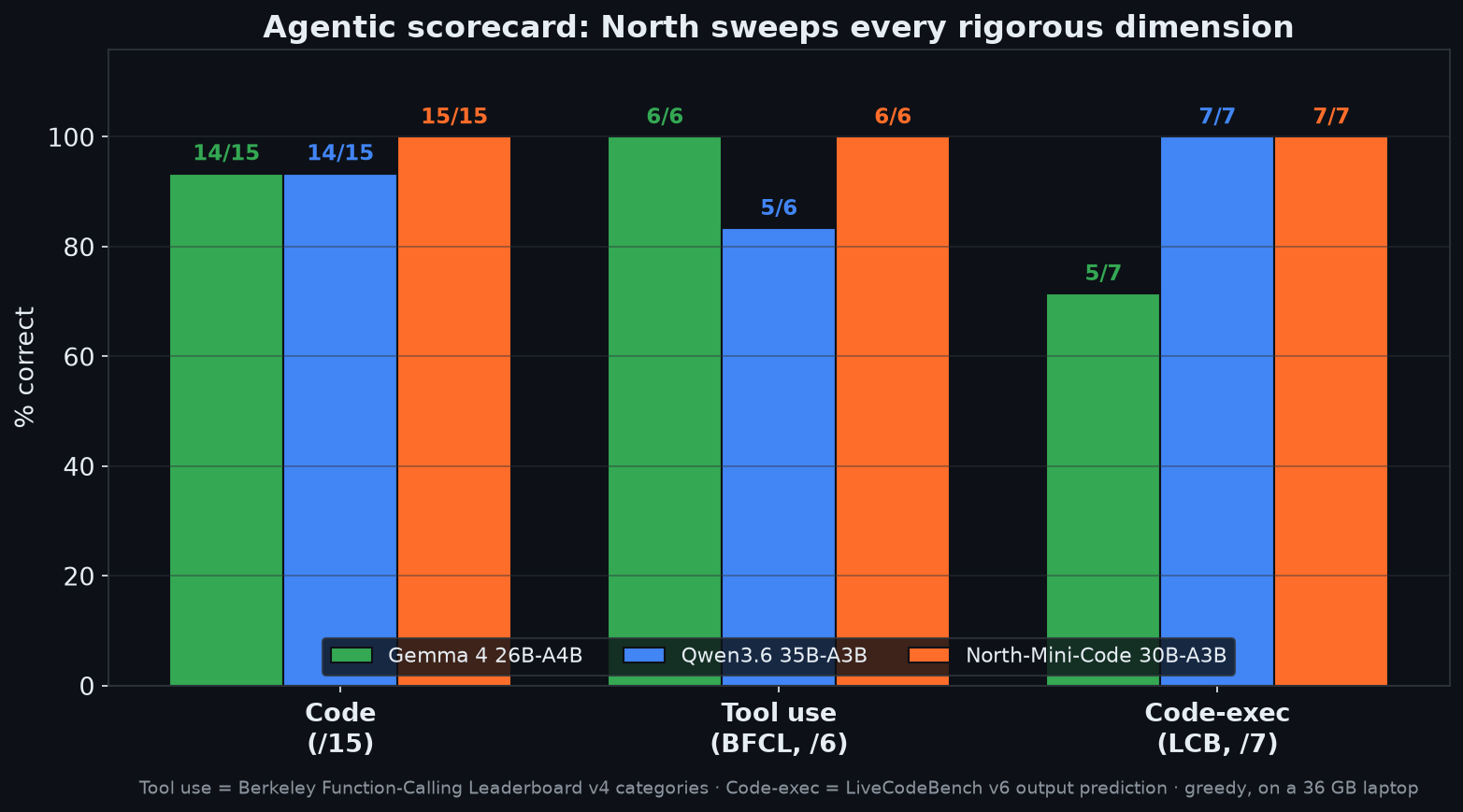
North runs the table: 6/6 tools, 7/7 execution, on top of 15/15 code. The agentic coding model is, unsurprisingly, the best agent, nailing the stateful multi-turn flight booking and every Python-semantics gotcha. Two findings make the others human:
- Gemma’s reasoning-spiral is real and repeatable. 6/6 on tools but 5/7 on execution, and the two misses were the gotchas, where it derived the correct answer then repeated it ~40 times until it ran out of tokens. The exact failure mode as the quine: when Gemma over-thinks, it can’t stop.
- Qwen reasons but lands the plane (7/7 execution, gotchas included), yet dropped one tool test, calling
get_weatherwith empty arguments on the simplest case. Solid reasoning, occasionally sloppy tool args.
The three-way showdown
Three 4-bit models, one 36 GB laptop. Coding gauntlet + agentic suites. Here’s the whole thing:
| 🟢 Gemma 4 26B-A4B | 🔵 Qwen3.6 35B-A3B | 🟠 North-Mini-Code 30B-A3B | |
|---|---|---|---|
| Size (Q4_K_XL) | 16 GB | 21 GB | 19 GB |
| MTP speedup | 1.41× (n=2) | 1.39× (n=3) | n/a |
| Gen speed (best) | 105.8 t/s | 93.5 t/s | 91.5 t/s |
| Prompt speed | 283 t/s | 250 t/s | 577 t/s |
| Coding gauntlet | 14 / 15 | 14 / 15 | 15 / 15 |
| The quine | ❌ spiraled | ❌ wrong | ✅ canonical |
| Tool use (BFCL v4) | 6 / 6 | 5 / 6 | 6 / 6 |
| Code-execution (LCB v6) | 5 / 7 | 7 / 7 | 7 / 7 |
| Wall-clock per task | fast | slowest | fastest |
| Pelican 🐦🚲 | good (on bike) | best (in motion) | worst (off bike) |
| Multimodal (sees images) | ✅ | ✅ | ❌ |
| Reasoning model | yes | yes | no (just codes) |
One caveat that grows into a whole section below: the quine row and the per-task times are at greedy (temp 0), the setting I used to keep the benchmark reproducible. At each model’s recommended temperature the reasoning models largely solve the quine too (Gemma goes 15/15). See “Best parameters for daily coding on a 36 GB Mac” near the end.
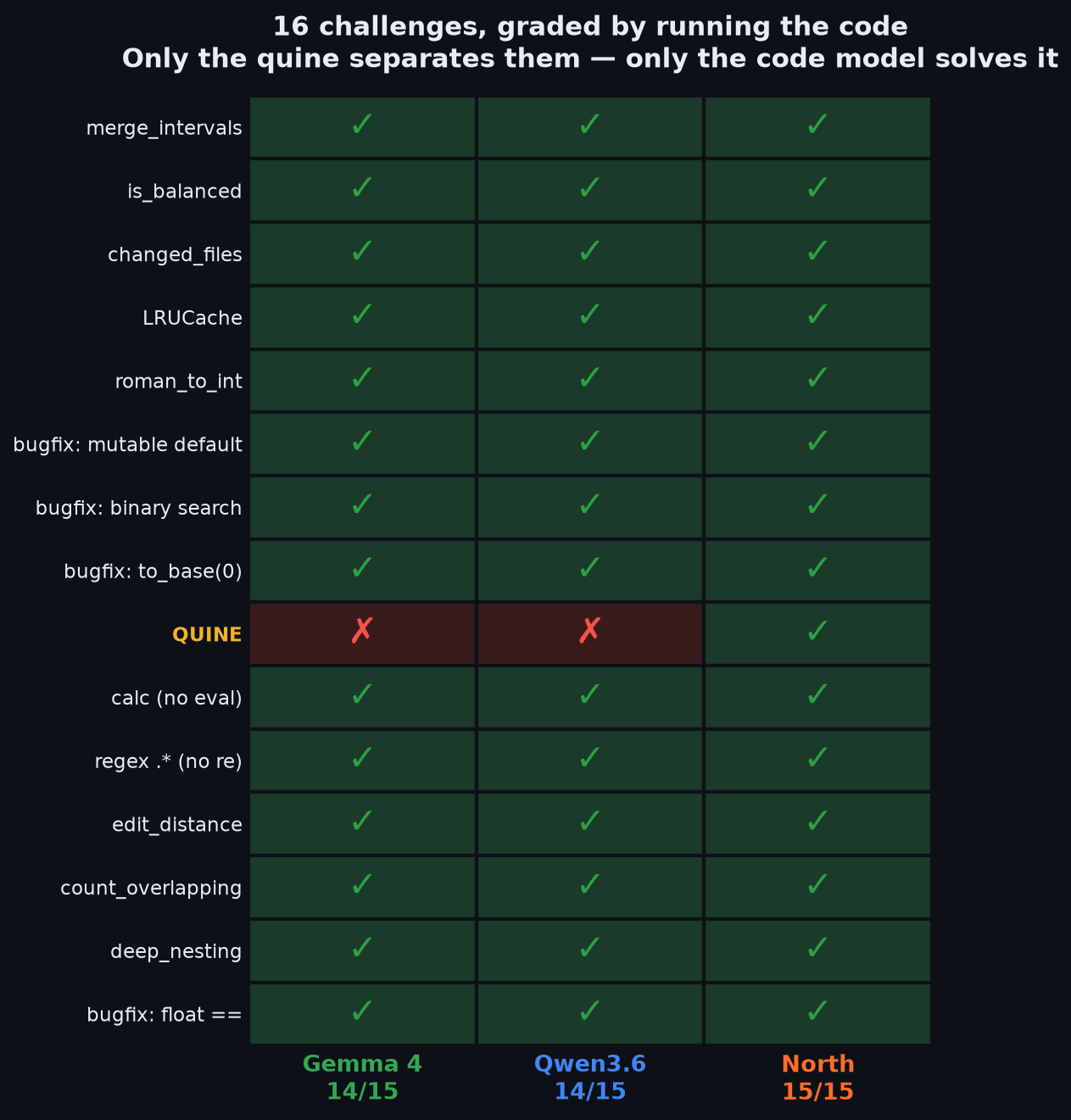
Every cell is code that was extracted and executed. The entire field is green except one row, the quine, and North is the only column that clears it.
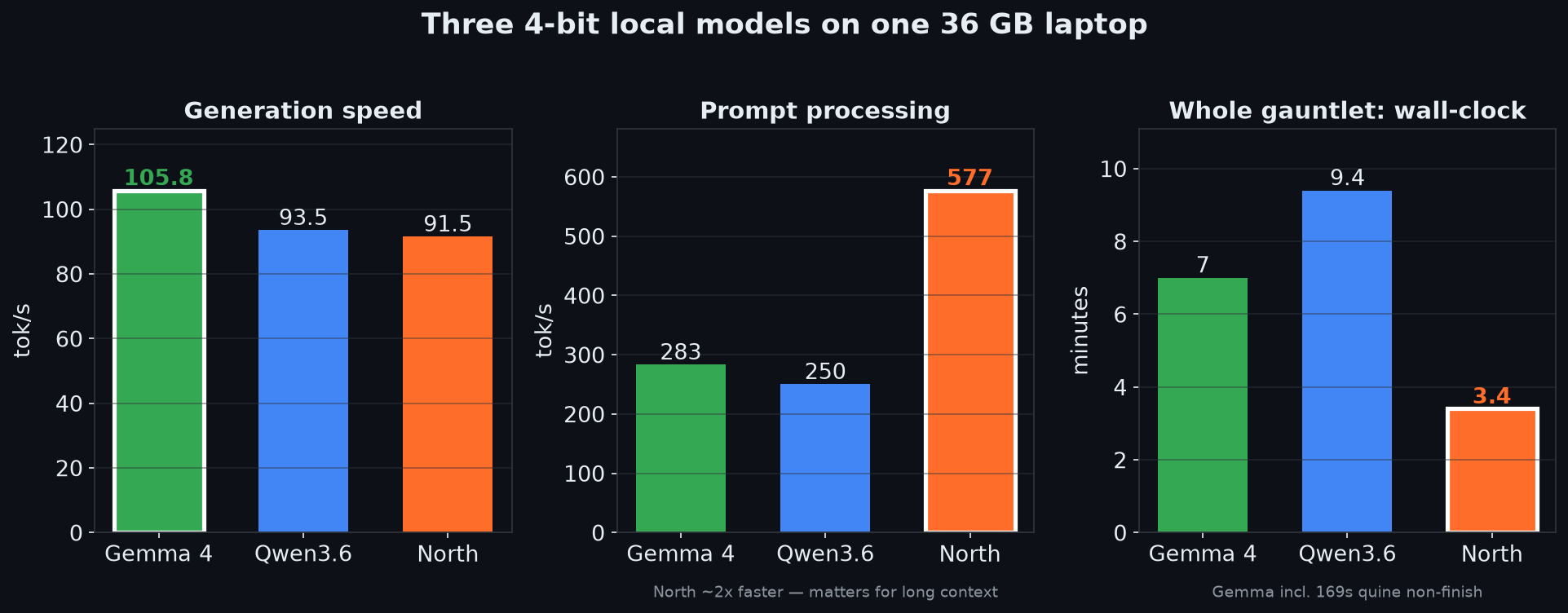
Gemma wins raw generation; North wins prompt processing (~2×) and finishes the whole gauntlet in a third of Qwen’s time, because it writes code instead of paragraphs about code.
The takeaways:
- All three are genuinely usable. 14-15 of 15 verifiable tasks, on a laptop, offline, at 4-bit. Local coding agents crossed the “actually good enough” line.
- Pick by job, not by leaderboard. North is the coding specialist, fastest, aced the gauntlet, wrote a quine, and swept the agentic suites (6/6 tools, 7/7 execution), but it’s text-only and has no creative/spatial sense. Qwen is the quality generalist, best on the open-ended task, but the slowest, by a lot. Gemma is the balance: fastest generation (with MTP), multimodal, solid everywhere, it just can’t quine.
- Reasoning isn’t free. Gemma and Qwen think, which helps nuance and burned them on the quine (one spiraled forever, one over-thought into a wrong answer). North just writes code, and on rigorous tasks it was both more correct and several times faster end-to-end.
- MTP is worth it where you can get it (~1.4× generation, identical output). North shows the other lever: a small active-param MoE is fast without a draft model, and its ~577 t/s prompt throughput is the unsung hero for agent workloads.
If I had to keep one on this laptop for day-to-day coding: North for pure code, Gemma when I want speed + screenshots, Qwen when I want the nicest output and don’t mind waiting.
Best parameters for daily coding on a 36 GB Mac
Everything above used greedy decoding (temperature 0), on purpose: it makes the benchmark reproducible. But greedy is not how you should actually run these models for real work, and it hid a twist.
That quine failure was mostly my fault, not the models’. Greedy always picks the single most likely next token, which is exactly how a model paints itself into a repetition corner. Switch to the temperature each model maker recommends for coding and the spiral disappears:
| Model | Greedy (temp 0) | At the recommended temperature |
|---|---|---|
| Gemma 4 | quine spirals (0/3), gauntlet 14/15 | temp 1.0: quine 3/3, gauntlet 15/15 |
| Qwen3.6 | quine wrong | temp 0.7: quine 2/3 correct |
Gemma at its recommended temperature 1.0 (yes, high, the Gemma team genuinely recommends high temperature for coding) wrote a correct quine on all three tries and went 15/15 on the full gauntlet, at the same speed. The model could always do it; greedy was the problem. (If you must run near-greedy, a repeat_penalty of 1.3 also breaks the loop. The DRY sampler at 0.8 did not.)
So for daily use, do not run greedy. Use the maker’s coding settings:
| Model | temp | top_p | top_k | other |
|---|---|---|---|---|
| Gemma 4 26B-A4B | 1.0 | 0.95 | 64 | min_p 0 |
| Qwen3.6 35B-A3B | 0.7 | 0.8 | 20 | repeat_penalty 1.05 |
| North-Mini-Code | 0.3 to 1.0 | 0.95 | 40 | robust; it never spiraled, even at greedy |
The 36 GB memory squeeze
The other half of “daily” is memory. You are not running a dedicated server box, you are coding while the model runs, so it has to share 36 GB with macOS, your editor, and a browser. With the full setup (MTP draft + projector + 32K context + a q8 KV cache), the picture is tight:
| Model (Q4_K_XL) | Free RAM with the server up, -c 32768 |
|---|---|
| Gemma 4 (16 GB) | ~17% (~6 GB) |
| North (19 GB) | in between |
| Qwen3.6 (21 GB) | ~10% (~3.6 GB), the tightest |
Two levers buy headroom, both nearly free for coding:
- Quantize the KV cache:
--cache-type-k q8_0 --cache-type-v q8_0(needs-fa on). Roughly halves KV memory with negligible quality cost on code, and the saving grows with context length. - Right-size the context: you rarely need 32K for a single coding turn. In this local setup, dropping to 16K to 24K frees several GB and is often the largest headroom lever. (llama.cpp also reserves an 8 GB prompt cache by default, which you can trim.)
The daily-driver config
Putting it together, the server I would actually keep running (Gemma, the best all-round daily pick: smallest, multimodal, fastest):
llama-server \
  -m gemma-4-26B-A4B-it-UD-Q4_K_XL.gguf \
  --model-draft MTP/gemma-4-26B-A4B-it-Q8_0-MTP.gguf \
  --spec-type draft-mtp --spec-draft-n-max 2 \
  --mmproj mmproj-BF16.gguf \
  --jinja --no-mmap -fa on -ngl 999 \
  --cache-type-k q8_0 --cache-type-v q8_0 \
  -c 24576 --parallel 1 --host 127.0.0.1 --port 8088
# then sample with: temperature 1.0, top_k 64, top_p 0.95, min_p 0
Swap in Qwen (--spec-draft-n-max 3, no --model-draft, -c 16384, temp 0.7) when you want the nicest output, or North (the PR build, no MTP, temp 0.3) for pure-code speed. The headline still holds, North is the specialist, but for a generalist daily driver on 36 GB, Gemma at temperature 1.0 with a q8 KV cache and a right-sized context is the sweet spot.
The real takeaway
A year ago, “local coding model” meant a toy you tolerated. Here are three different 4-bit models, none over 21 GB, each solving ~15 of 15 real, executed coding tasks on a laptop, offline, fast enough to drive an agent. The question stopped being “is local good enough?” It is. The new question is “which specialist do I load today?”, and you can hold the answer to that on a USB SSD.
The only model that wrote a quine out of the box was the one built to code. The reasoning models got there too, but only at the temperature their makers recommend, not the greedy default I benchmarked on. The only ones that drew a believable pelican were the ones built to think. Nobody got everything for free. That’s the whole map of where open-weight coding agents are in mid-2026, drawn in 16 challenges and one parameter sweep.
Everything here reproduces: the build, the exact GGUFs, the sweep scripts, the gauntlet, and the three pelicans. Clone it, point it at your machine, and sweep --spec-draft-n-max yourself, your optimum won’t be mine. Then go argue about the pelicans.
The cost angle, and where this lives
Every number in this piece came from models running on one machine, offline, for $0 in API spend. That is the whole point: local inference is the cheapest token you will ever run. But “local or a cloud API” is a real decision with real math, and the cloud side is easy to underestimate until the invoice lands.
That math is what I build at ByteCosts: source-backed per-token and per-context pricing, model-versus-model comparisons on standardized assumptions, and calculators that turn a workload into a monthly number before you ship. Know the real cost before the invoice. If this kind of measured, no-hand-waving breakdown is your thing, the whole site is more of it.
Hardware: Apple M4 Max, 36 GB, macOS 26.5. llama.cpp 57fe1f0 (Gemma/Qwen) + PR #24260 (North). Models: Unsloth GGUFs at UD-Q4_K_XL. All numbers measured June 2026.
Sources and method
What is measured here: every speed, token count, pass or fail, and timing in this piece was produced on the machine described above (Apple M4 Max, 36 GB), running the exact GGUFs and quant tier (Unsloth UD-Q4_K_XL) described in this writeup. Nothing is copied from a vendor benchmark table. What is cited, not re-run: the tool-use and code-execution suites reuse the task definitions and grading rules of public benchmarks (BFCL v4, LiveCodeBench v6); SWE-bench Verified and the heavier agentic benchmarks are referenced as out of scope for a laptop run. Model prices in the cost section come from the ByteCosts model index.
Local AI coding showdown on a 36 GB Mac: Gemma vs Qwen vs North. ByteCosts. Updated 2026-09-05. https://bytecosts.com/blog/local-ai-coding-showdown-gemma-qwen-north/